
Common errors
Network error in the chat
Section titled “Network error in the chat”The message is sent, a thread title appears, then the answer stays on the loading dots and ends with a red Network error. The streaming connection to api.gpt.space was cut:
- Reload the page and send the message again; in the side panel, close and reopen the panel.
- Disable ad blockers, privacy extensions and antivirus web shields for
gpt.space, or test in an incognito window. - On a corporate or filtered network, ask the administrator to allow
api.gpt.spaceand streaming (server-sent events) to it. Try from another network to confirm. - Clear the cache at https://gpt.space/app/debug.
If even “2+2” fails from several browsers and networks, write to contact@gpt.space with the time of the attempt and your account email.
AI_APICallError: No endpoints found
Section titled “AI_APICallError: No endpoints found”The AI provider of the selected model is unavailable for the parameters of the request. It is temporary: retry a few minutes later, or switch the model (in Sheets, remove the model parameter or use "standard"; in the chat, pick another model). If it lasts more than an hour, tell us which formula or model fails.
Sign in keeps returning to the sign-in page
Section titled “Sign in keeps returning to the sign-in page”See Sign in keeps sending me back to the sign-in page.
Blank page or frozen page
Section titled “Blank page or frozen page”Usually the cache or the local storage of the browser.
- Go to https://gpt.space/app/debug and click Clear cache.
- If it persists, clear the site data by hand: right-click ➤ Inspect ➤ Application tab ➤ Clear site data.
- Close the browser and start it again.
Sign in or connection issue
Section titled “Sign in or connection issue”Reset the connection to your Google account:
- Open your Google account connections.
- Click GPT Workspace, then Delete all connections you have with GPT Workspace.
- Come back to GPT Workspace and sign in again, accepting all the requested permissions.
See also Authorization is required to perform that action.
Out of credits
Section titled “Out of credits”The chat shows You have no credit left and formulas show “Quota exceeded. Please upgrade your plan”. Your monthly credits are used up: upgrade, top up, activate pay per usage on Standard and Pro, or earn free credits. The subscription page shows when the quota resets.
Exceeded maximum execution time
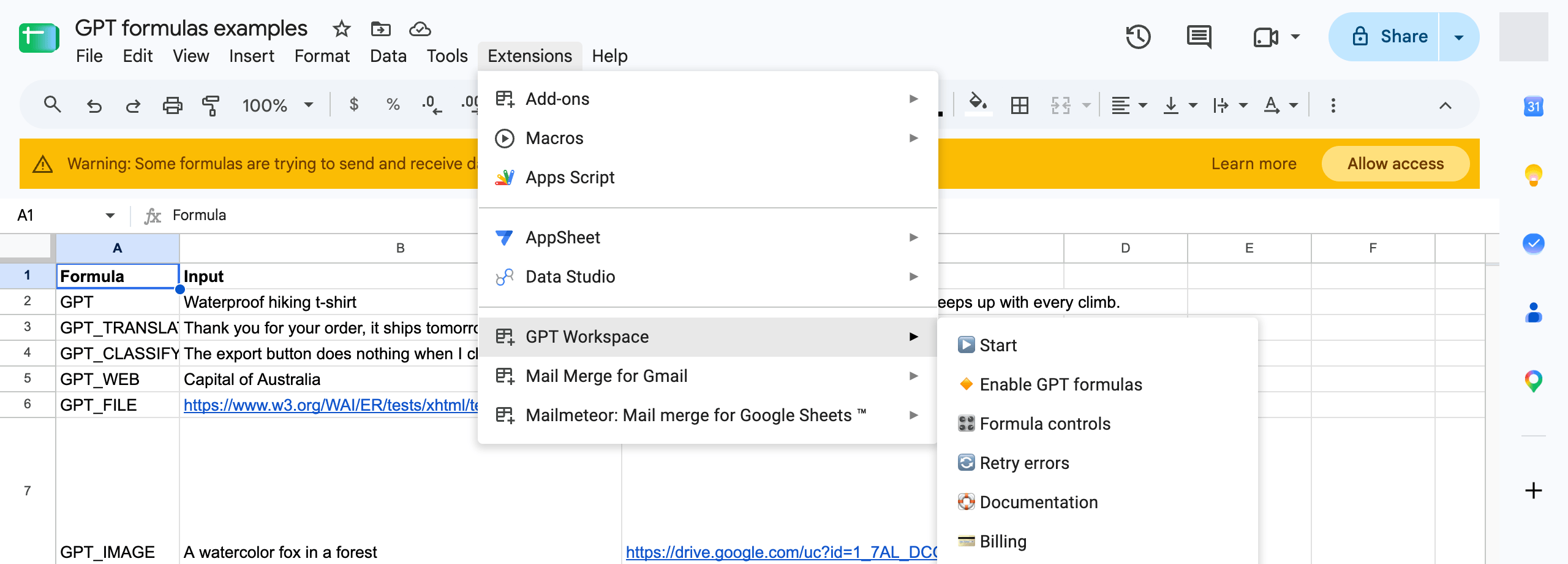
Section titled “Exceeded maximum execution time”A Sheets formula took more than the time Google allows for a custom function. It happens under heavy load of the AI providers or with very long prompts. Wait a few minutes, then click Extensions ➤ GPT Workspace ➤ 🔄 Retry errors to re-run only the failed cells.
The menu only shows Start
Section titled “The menu only shows Start”Before authorization the add-on menu only has ▶️ Start. Click it, accept the permissions, reload the spreadsheet and the full menu appears.
I can’t install the extension
Section titled “I can’t install the extension”If the add-on is not visible after installing it from the Marketplace, you are probably signed in to several Google accounts in the same browser. See I can’t install the extension.
Overlapping or unreadable text in the chat
Section titled “Overlapping or unreadable text in the chat”The chat window renders text on top of itself after an update: the browser kept an old version of the app. Clear the cache at https://gpt.space/app/debug, then hard-reload (Ctrl+Shift+R, or Cmd+Shift+R on Mac). Browser zoom below 80% and “force dark mode” extensions also break the layout.
My chat history does not load
Section titled “My chat history does not load”The threads are listed in the sidebar but opening one stays empty. Clear the cache as above and reload; if a single thread still fails, it may be too large for the browser, open it from another device or ask us to export it. Threads are kept on your account until you delete them or the account.
The agent is stuck on “fetching files”
Section titled “The agent is stuck on “fetching files””A long task in Drive or Gmail (extracting many PDFs to a sheet, reading a big folder) can take several minutes; a step that stays for more than ten minutes has failed. Stop it, then split the task: one file or a few rows per request, and give the agent the file links rather than a description to search for. See What the agent can do.
Line breaks are missing in Sheets results
Section titled “Line breaks are missing in Sheets results”The model answered in one paragraph, or the cell does not show them. Ask explicitly (“separate the items with line breaks”), enable Wrap text on the cells (Format ➤ Wrapping ➤ Wrap), or use =GPT_LIST which returns one item per cell. Results come from the cache until the prompt changes, see Refresh or freeze GPT cells.
Response is cut or incomplete
Section titled “Response is cut or incomplete”In Sheets, the answer exceeded the maximum output tokens: raise Output tokens in Formula settings or ask for a shorter answer. In the chat, ask the agent to continue.
Service invoked too many times for one day: urlfetch
Section titled “Service invoked too many times for one day: urlfetch”You reached Google’s daily quota of calls to external services from Google Sheets: about 20,000 per day for @gmail.com accounts and 100,000 for Google Workspace accounts. Wait 24 hours, or use a Google Workspace account.
429: Rate limit reached
Section titled “429: Rate limit reached”Too many requests per minute. Wait one minute and retry (Retry errors in the add-on menu re-runs the failed cells).
#NAME? Unknown function: ‘GPT’
Section titled “#NAME? Unknown function: ‘GPT’”The GPT formulas are not enabled in this spreadsheet. Click Extensions ➤ GPT Workspace ➤ 🔸 Enable GPT formulas.
Please activate the extension first
Section titled “Please activate the extension first”A formula ran before the add-on was opened in this spreadsheet. Click Extensions ➤ GPT Workspace ➤ ▶️ Start once, then re-run the formula.
Please upgrade to a Pro or Standard plan to use advanced models
Section titled “Please upgrade to a Pro or Standard plan to use advanced models”The formula asks for "advanced" but the account is on the free or Starter plan. Remove the model parameter or upgrade.
Formula parse error
Section titled “Formula parse error”Check that:
- your prompt is in quotes if it is not a cell:
=GPT("hello")and=GPT(A1)work,=GPT(hello)does not; - you use your locale’s argument separator,
,or;; - you use your locale’s decimal separator for the temperature,
0.8or0,8; - the arguments are in the right order, see the formulas reference.
Credits ran out faster than expected
Section titled “Credits ran out faster than expected”See Why did my credits run out so fast?.
I paid but still see the free plan or an upgrade message
Section titled “I paid but still see the free plan or an upgrade message”See I paid but my account still shows the free plan.
Out of quota while I still have credits
Section titled “Out of quota while I still have credits”In Sheets, formulas are billed to the file owner when the person running them is in another Google Workspace domain. See “Out of quota” error even though I have tokens.