
I can't find the add-on from the sidebar
In Google Docs, Sheets, Slides and Forms, the add-on is in the Extensions menu, not in the panel on the right. Click Extensions ➤ GPT Workspace ➤ ▶️ Start.
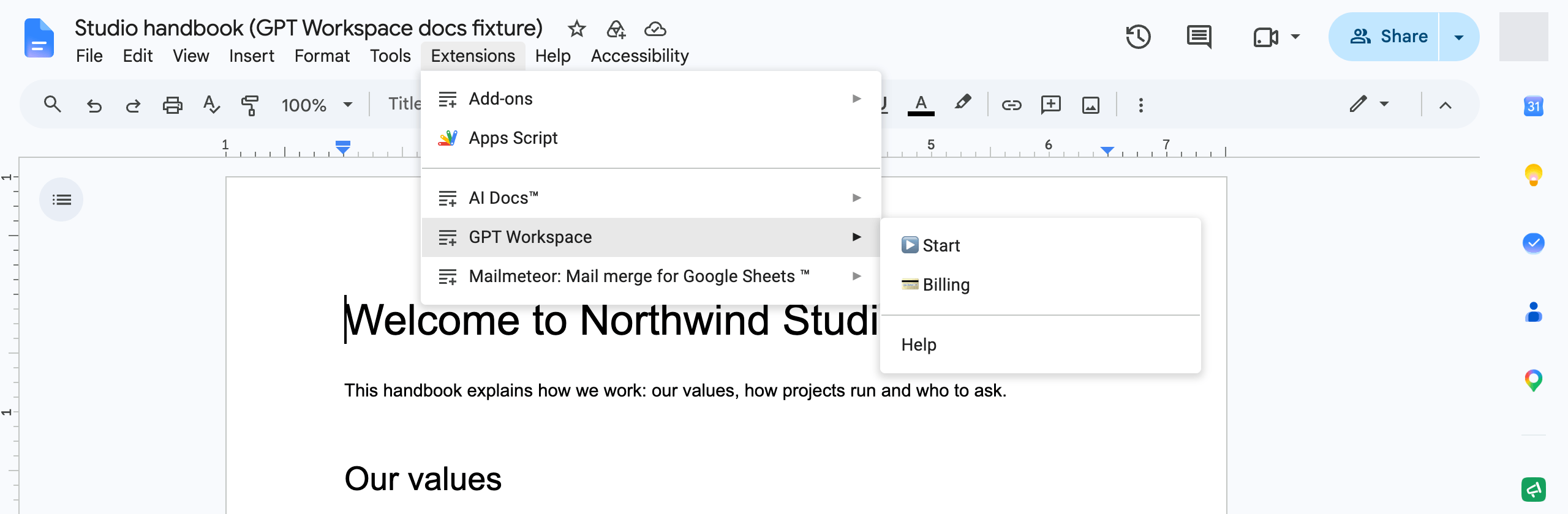
Where is the Extensions menu?
Section titled “Where is the Extensions menu?”It is in the menu bar at the top of the document, after Tools and before Help: File, Edit, View, Insert, Format, Tools, Extensions, Help. In Forms, the Extensions menu is the puzzle icon in the toolbar. The menu bar is hidden when the document is in full screen (View ➤ Full screen); press Esc to show it again.
Add-ons only run in the desktop browser versions of Docs, Sheets and Slides. The Google mobile apps and the mobile web versions have no Extensions menu; on a phone, use the web app chat instead.
The “agent” or “chat” in the sidebar is what ▶️ Start opens: there is no separate icon in the right panel of Docs, Sheets and Slides. If you installed the Chrome extension, its chat is the Chrome side panel, opened with the extension icon or Ctrl+Shift+Space (Cmd+Shift+Space on Mac), see Side panel and shortcuts.
If GPT Workspace is missing from the Extensions menu:
- Reload the page; the add-on menu is added when the file opens.
- Check that the add-on is installed for this Google account on the Marketplace: the button should say Uninstall.
- If you use several Google accounts in the same browser, see I can’t install the extension.
In Gmail and Drive the add-on is in the side panel on the right, see How to launch the Gmail and Drive add-on.