
GPT for Gmail
Two products bring GPT Workspace into Gmail:
- The Chrome extension adds buttons to Gmail itself: Summarize on a thread, AI Reply, a write bar in the compose window and smart reply chips. They are described on Gmail features of the extension.
- The GPT for Gmail add-on from the Marketplace adds a card in Gmail’s right-hand panel, in any browser and in the Gmail mobile app.
The side panel chat also works with your mail from anywhere: “Find the emails that contain invoices for 2025”, “Send a reply to the last received email”, “Assign a label”. See What the agent can do.
Install the add-on
Section titled “Install the add-on”Install GPT for Gmail from the Google Workspace Marketplace (it is also part of the GPT Workspace add-on). The GPT Workspace icon then appears in the panel on the right of Gmail.
Reply to an email
Section titled “Reply to an email”Open a message and click the GPT Workspace icon in the right-hand panel. The Reply with AI card offers two ways in:
- Suggest replies reads the message and shows a short summary, three ready-to-send quick replies and a few directions you could answer in. Tap a quick reply to open a reply draft with that text; the pencil next to it opens the draft editor first.
- Write your own: describe the answer you want (or pick one of the suggested directions) and click Write reply.
The draft editor shows the generated reply with Shorten, Expand, More formal, Friendlier and Regenerate, plus a box for your own instruction (Apply). Insert as reply opens the reply with the draft; Start over returns to the message card.
Write a new email
Section titled “Write a new email”Click Compose, then the GPT Workspace icon in the compose toolbar. Describe the email, or pick a starter (follow up, thank you, propose a meeting time, decline politely), and click Write. Adjust the draft the same way as a reply, then Insert into email adds it to the message you are writing.
Your Gmail signature
Section titled “Your Gmail signature”A reply draft created by the add-on carries your Gmail signature under the generated text, as a reply you opened yourself would, and the model is told not to type a signature block of its own.
Your plan from Gmail
Section titled “Your plan from Gmail”Open the add-on without a message selected to see how to use it, your current plan and credits, with Upgrade or Manage and Get free credits buttons. When the month’s credits are used up the add-on says so and links to the plans.
Extension features
Section titled “Extension features”With the Chrome extension installed, Gmail gets:
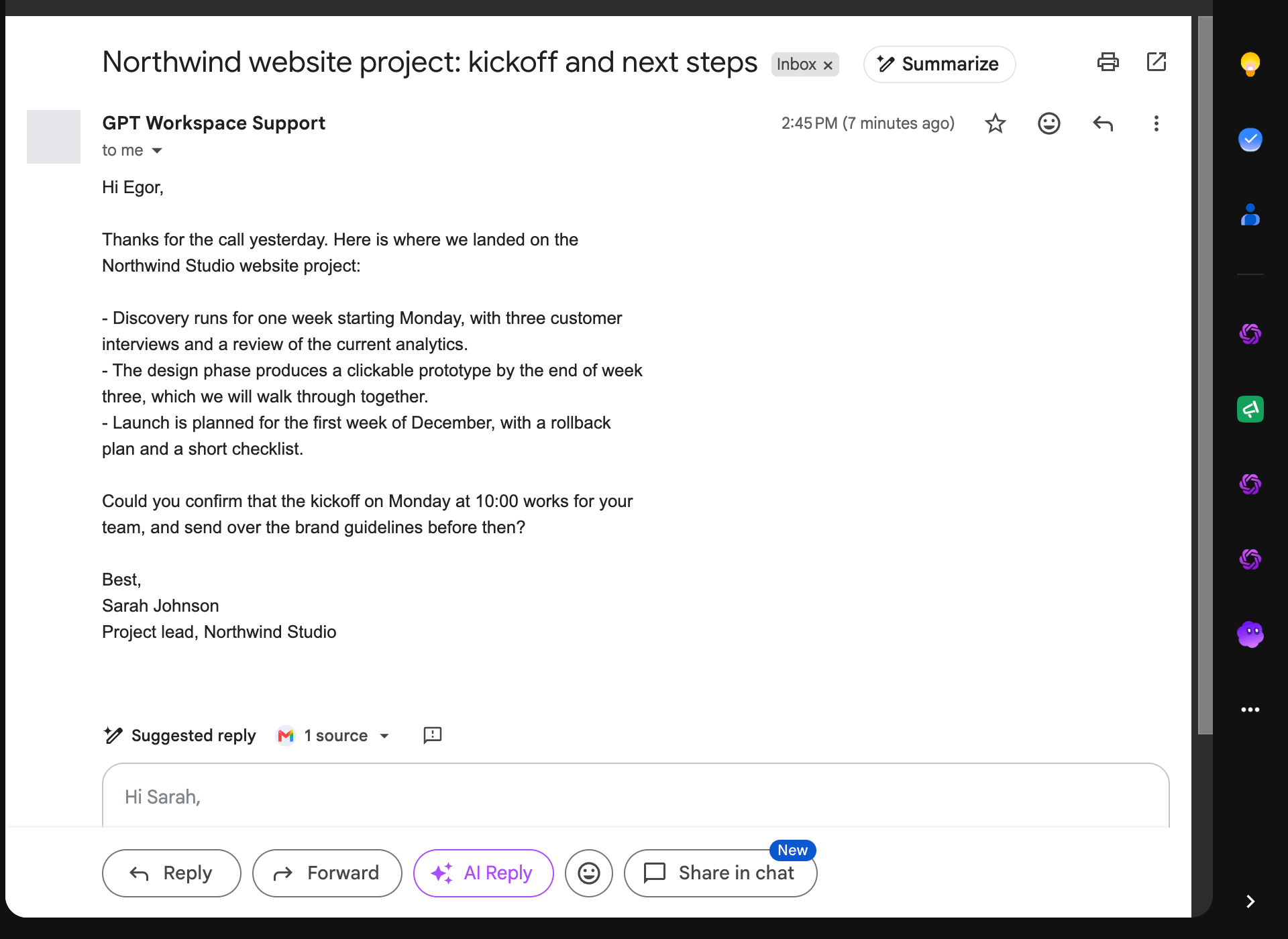
- Summarize next to the subject: a summary, the key points and the action items of the thread.
- AI Reply next to Forward and Send: opens the reply and the side panel.
- Write bar in the compose window: describe the email, click Create, the draft is inserted.
- Smart replies: three reply chips under the last message, written from the thread.
Details and limits on Gmail features.